Rasa NLU is an open-source natural language processing tool that can form the backbone for your next chatbot. Let’s look at few terms that you’ll keep hearing when talking about a Rasa chatbot.
| Component name | Meaning |
|---|---|
| Intents | Things you expect users to say. Defined in nlu.md file |
| Entities | Pieces of info you want to extract from messages. Defined in nlu.md file |
| Actions | Things your bot can do and say. Three kinds of actions : Default actions, utter actions, custom actions |
| Responses | What the bot is capable of saying |
| Slots | Like variables in a normal program. Used to hold some information. They are a store of key-value data and act like the bot’s memory. |
All these should be mentioned in the domain.yml file – that’s where we define the domain of the bot. Now that you know the terms, let’s see how they work together.
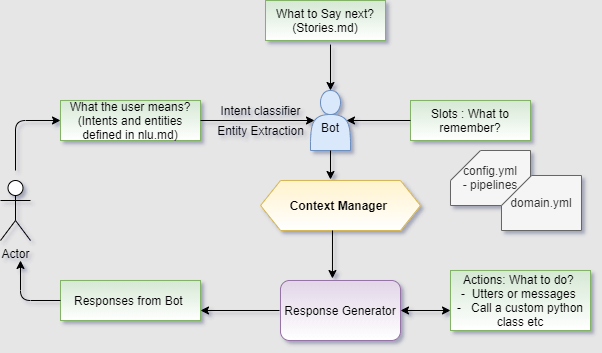
Parts of a chatbot
Intent Classifier
The bot must classify the user inputs and infer the intent so that it can respond accordingly. An intent classifier may internally use word embedding and neural nets to achieve its output. The classifiers are defined in the pipelines section of config.xml
Entity Extraction
After finding the intent, the bot must find the entities present in the user input if there are any. The values of the entities will fine-tune or add more meaning to the intent. This is important for generating a correct bot response.
Context Manager
The bot must always be mindful of the context of the utterances of the user to comprehend the accurate meaning of the message.
Response Generation
Based on the intent, its entities and context of the utterance, the bot must generate a response and send it to the user.
Let’s get our hand’s dirty by creating a Rasa bot
I recommend to install all the packages in a python 3 virtual environment. I can’t stress enough how much time it will serve when you eventually mess up the environment.
There are two options here: Choose your path or do both.
- Create a default Rasa bot from scratch that can do simple things
- Clone a git project and get a feel for intermediate level things that a Rasa bot can do
Create a Default Rasa bot
Inside your Python 3 virtual environment, install rasa with pip install rasa .
Once installation is complete, create a new directory and initiate rasa with rasa init
rasa init will create all the default files such as data/nlu.md , data/stories.md , domain.yml, config.yml, endpoints.yml
Train the existing content with command rasa train. This will create a new model under models directory. When you eventually run the bot, the model you just created by the train call will drive user interaction with the bot.
To see what the bot can do execute rasa shell . This will open up an interactive shell that allows you to chat with the bot.
The bot might be a dull thing now, but you can make it funny or wild or even weird by changing the contents of nlu.md. Only the intents and entities defined in this file is captured by the bot , while the possible turns a bot can take is defined in the stories.md file.
Create a bot that can do more
Now that you know how to create a basic bot that can talk to you on the terminal, let’s go a step further by making the bot do more. Refer the README of the github project for more details.
Let’s make your bot call a custom api ,
Let’s wrap your brother bot in a flask and run it as a web app.
Go get the code from github at: https://github.com/NijilChandran/CovidBot-RASA
Train the bot like you always do,
Run the action server, and know where all custom things happen ,
Run your flask app, follow the link and talk to your bot on localhost
 Nijil Chandran
Leave a comment